Which baby monitor fits your family’s space, budget, and safety needs
Audio monitors work for small homes under 1,500 sq ft and tight budgets. Video monitors suit larger spaces or anxious parents who want to see the baby. Movement and breathing monitors add a layer for preemies or high-risk infants, but they cost $200 to $300 and trigger false alarms.
On this page (7 sections)
- Audio monitors cover small homes and tight budgets without the anxiety tax
- What baby monitor features matter for different home sizes
- How to match monitor type to budget and parenting style
- Which safety standards and weight or age limits apply to baby monitors
- Common problems with baby monitors and what to avoid
- When to skip the monitor entirely or add a second camera later
- Questions people still ask
Part of our guide on fit advice for average height
The numbers
- Audio range
- 300 to 1,000 ft, halved by walls
- Video monitor cost
- $80 to $300
- Movement monitor price
- $200 to $300
- Battery audio runtime
- 12 to 24 hours per charge
- Wi-Fi dependency
- High for app-based models
- False alarm rate
- 1 to 3 per week, movement monitors
Audio monitors cover small homes and tight budgets without the anxiety tax
An audio monitor works when you live in 1,500 square feet or less and you trust your instincts. You hear cries, coughs, and fussing clearly. You don't get the visual spiral of watching every breath or checking the screen every ten minutes. Most models cost $25 to $60, run on rechargeable batteries for 12 to 24 hours, and last through two or three kids without breaking.
Audio-only monitors use DECT or FHSS transmission, which cuts through walls better than Wi-Fi and doesn't depend on your router. Stated range is usually 900 to 1,000 feet, but count on half that once you account for interior walls, appliances, and metal ductwork. Walk the farthest point in your house or yard with the monitor on and check the signal before the return window closes.
Parents in apartments or single-story ranch homes rarely need more. You're close enough to hear through the door anyway, and the monitor gives you freedom to step outside or run the washer without missing a cry. If you're in a two-story house and the nursery is upstairs, test whether the signal reaches your basement or back deck. If it doesn't, you need video with better range or a Wi-Fi model.
Audio monitors don't record, don't get hacked, and don't need firmware updates. That's the trade-off: no remote viewing from work, no playback, no room-temperature readout. If you're the type who checks your phone every hour to see the baby, audio will frustrate you. If you'd rather not have another screen to compulsively open, it's exactly right.
- Costs $25 to $60, fits any budget
- Runs 12 to 24 hours on one charge
- No Wi-Fi, no hacking risk
- Works through walls better than video
- No visual confirmation
- Range drops to 300-500 ft indoors
- No recording or playback
- Won't satisfy anxious checkers

VTech DM221-2 Digital Audio Baby Monitor with 2 Parent Units
Offers 1000 ft range and rechargeable batteries, meeting the 12+ hour runtime requirement with adjustable sound sensitivity to save battery.
What baby monitor features matter for different home sizes
A 1,200 square foot apartment needs a basic audio or entry-level video monitor with 300 to 500 feet of indoor range. You're never more than two rooms away. Spending $150 on pan-tilt-zoom or a five-inch screen wastes money you'll need for diapers. A simple fixed-angle video monitor with a 2.4-inch screen shows you the crib clearly and costs $60 to $90.
Homes between 1,500 and 2,500 square feet usually span two floors or have a long hallway. Audio monitors start to cut out when you're in the garage or the far bedroom. You want a video monitor with 900 to 1,000 feet of claimed range, which translates to 400 to 600 feet indoors. Look for models that let you add a second camera later if you have two kids in separate rooms. Budget $100 to $150 for a monitor that won't drop signal when you're folding laundry in the basement.
Houses over 2,500 square feet or properties with a detached garage or guesthouse need either a Wi-Fi-based monitor or a very high-range closed-circuit model. Wi-Fi monitors work anywhere your home network reaches, but they depend on your router staying up and your internet speed staying decent. If your router is in the front office and the nursery is in the back corner upstairs, the video will stutter or freeze. A mesh Wi-Fi system solves that, but now you're spending another $200 on networking to make a $130 monitor work.
Closed-circuit monitors with 1,500 to 2,000 feet of stated range exist, but they cost $180 to $250 and still cut to half that indoors. For very large homes, a Wi-Fi monitor with a good mesh network is usually the simpler answer. Just make sure the camera has local recording or a base station so you're not blind if the internet goes out at 2 a.m.
| Home size | Monitor type | Indoor range needed | Typical cost |
|---|---|---|---|
| Under 1,500 sq ft, single story | Audio or basic video | 300 to 500 ft | $25 to $90 |
| 1,500 to 2,500 sq ft, two story | Video, closed-circuit | 400 to 600 ft | $100 to $150 |
| Over 2,500 sq ft or detached spaces | Wi-Fi with mesh network | Full home coverage | $130 to $200 + mesh |

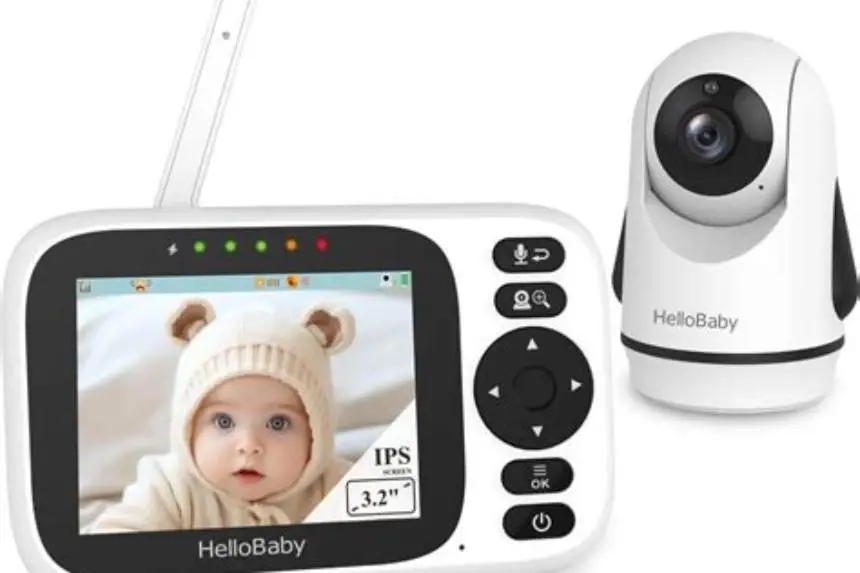
Anicebb 5" HD Video Baby Monitor with Camera and Audio
Provides a 1000 ft range with a 5-inch HD screen and expandable camera support, suitable for larger homes needing video monitoring.
How to match monitor type to budget and parenting style
If your budget is under $50, buy an audio monitor and skip the video guilt. You'll hear everything that matters, and you won't spend the first six months glued to a screen watching your baby's chest rise and fall. Audio monitors from VTech or Safety 1st cost $25 to $45, last for years, and free you from the anxiety of constant visual checking. That's the right call for parents who trust their instincts and don't need to see the baby to know they're okay.
A budget of $80 to $120 gets you a solid video monitor with a handheld screen, two-way talk, and a fixed or manually adjustable camera. This range suits parents who want occasional visual confirmation but don't need remote access from their phone. The Infant Optics DXR-8 and similar models sit here. You get a 3.5-inch screen, decent night vision, and a camera you can reposition as the baby grows and starts standing in the crib.
Spending $150 to $250 makes sense if you want app access, remote viewing from work or the grocery store, or high-definition video you can actually see clearly. These monitors usually connect over Wi-Fi, send alerts to your phone, and let grandparents check in from another state. They suit parents who travel for work, split custody, or just feel better seeing the baby when they're not home. The Nanit and Owlet Cam fall into this range. The trade-off is dependency on your network and a subscription fee for video history or advanced alerts: usually $10 to $20 per month.
Movement and breathing monitors cost $200 to $300 and suit preemies, babies with a SIDS family history, or parents whose anxiety is high enough that the device brings genuine peace. The Owlet Smart Sock tracks heart rate and oxygen saturation and sends an alarm if either goes out of range. It also triggers false alarms weekly: the sock slips off, the baby rolls onto it, or the connection glitches. If false alarms will spike your stress rather than ease it, skip this category. If seeing live stats calms you, it's worth the cost. Just know the American Academy of Pediatrics does not recommend these devices as SIDS prevention, and they are not medical-grade monitors.
Which safety standards and weight or age limits apply to baby monitors
Baby monitors sold in the U.S. must meet FCC radio-frequency standards and CPSC safety rules for electronics in nurseries. They are not medical devices, so they don't require FDA clearance unless they make a health claim. The Owlet Smart Sock was forced to stop marketing itself as a SIDS-prevention device in 2021 but still sells as a general wellness tracker. No monitor can prevent SIDS. Safe sleep practices (back sleeping, firm mattress, no loose bedding) do the real work.
Wearable monitors like the Owlet sock or the Nanit breathing band have weight and age limits. The Owlet sock fits babies 6 to 25 pounds and stops working accurately once your baby outgrows that range, usually around 12 to 15 months. The sensor relies on a snug fit, and a loose sock triggers false alarms or fails to detect real changes. If your baby was premature or small for gestational age, check the minimum weight: some models don't work reliably under 6 pounds.
Camera monitors have no weight or age limits, but cord safety matters. The camera's power cord must stay at least three feet from the crib to prevent strangulation. Mount the camera on the wall or set it on a high shelf the baby can't reach as they grow. By 8 to 10 months, babies pull themselves up and grab at anything within reach. A camera on the crib rail becomes a hazard.
Two-way talk features let you soothe the baby remotely, but they can also startle a sleeping baby if the volume is too high or you accidentally trigger it. Test the speaker volume from inside the nursery before you rely on it at 3 a.m. Some monitors let you disable the speaker entirely if you find it more disruptive than helpful.
- FCC and CPSC compliance: required for all monitors sold in the U.S., covers radio emissions and electrical safety
- Weight limits for wearables: typically 6 to 25 pounds, ending use around 12 to 15 months
- Cord distance from crib: at least three feet to prevent strangulation risk
- Wall-mounting after 8 months: babies pull up and grab; move the camera out of reach
Common problems with baby monitors and what to avoid
Interference from cordless phones, microwaves, and Wi-Fi routers cuts video quality and drops audio. Monitors using 2.4 GHz FHSS share the same frequency as your router, your neighbor's router, and your baby's white-noise machine. If the video stutters or you hear static, move the camera or the router farther apart, or switch the router to the 5 GHz band if your monitor supports dual-band. Audio monitors on 1.9 GHz DECT avoid most interference but cost a bit more.
Battery life on handheld screens drains fast when the display stays on constantly. Most video monitors last 4 to 8 hours with the screen lit and 10 to 14 hours in voice-activated mode, where the screen wakes only when the baby makes noise. If you want to carry the monitor around all evening, voice-activated mode is essential. If you plan to keep it plugged in on your nightstand, battery life doesn't matter.
Wi-Fi monitors lose connection when your internet goes out or your router reboots. Some models store video locally on an SD card or base station so you're not blind during an outage, but many app-only monitors just stop working. If your internet is unreliable or your router sits far from the nursery, a closed-circuit monitor is safer. You'll lose remote access, but the monitor will work every single night.
False alarms from movement monitors happen when the sensor loses contact: sock slips off, chest band shifts, or the baby rolls onto the sensor wrong. Expect one to three false alarms per week in the first few months as you learn to position the device correctly. If you're already sleep-deprived and anxious, a 2 a.m. alarm when nothing is wrong can break you. Some parents find the peace of seeing live stats worth the false positives. Others return the device after the third middle-of-the-night panic.
Hacking risks exist for Wi-Fi monitors, especially older models with default passwords or no encryption. Change the default login immediately, enable two-factor authentication if the app offers it, and keep the firmware updated. Closed-circuit monitors that don't connect to the internet can't be hacked remotely, but they also can't be viewed remotely. Pick the risk you're more comfortable with.
When to skip the monitor entirely or add a second camera later
You don't need a monitor in the first few weeks if the baby sleeps in your room in a bassinet next to the bed. The American Academy of Pediatrics recommends room-sharing for at least six months, ideally a year, to reduce SIDS risk. A monitor becomes useful when you move the baby to their own room or when you need to do things in another part of the house while they nap. Until then, you'll hear every grunt and squeak without a device.
Parents of multiples (twins or triplets) benefit from a monitor that supports multiple cameras on a single screen or app. Most mid-range video monitors let you add a second camera for $60 to $100 and toggle between views. If your twins share a room, one wide-angle camera usually covers both cribs. If they're in separate rooms, you'll want two cameras and a monitor that can split-screen or alert you which baby is crying.
A second camera also makes sense when you have a toddler and a baby in different rooms. You can check both without walking back and forth, and you'll know which kid is awake and which is still asleep. Buy a monitor that supports expansion from the start, even if you only use one camera at first. Adding a camera later is cheaper than replacing the whole system.
Skip the monitor if you live in a studio or a small one-bedroom and you're always within earshot. A $90 video monitor that sits unused on the shelf is $90 you needed for something else. Trust yourself to hear your baby, and spend the money on a good bassinet, a hands-free pump, or the diaper subscription that's about to become your best friend.
Questions people still ask
Do I need a video monitor if I already have an audio one?
Not unless your home is large enough that audio cuts out or you're the type who needs to see the baby to feel reassured. Audio tells you everything you need to know for the first year. Video is helpful once the baby starts pulling up and you want to check whether they're standing, stuck, or just fussing back to sleep. If the audio monitor covers your space and you're not anxious, keep it.
Can I use my phone as a baby monitor instead of buying one?
Yes, with apps like Cloud Baby Monitor or Baby Monitor 3G that turn two phones or tablets into a monitor system. It works, but your phone stays in the nursery all night, so you can't use it for anything else. The battery drains fast, and if someone calls you, the app pauses. A dedicated monitor costs about the same as one month of your phone bill and does the job without tying up your device.
How do I know if a Wi-Fi monitor will work with my router?
Check the app's requirements before you buy. Most Wi-Fi monitors need a 2.4 GHz band, a minimum upload speed of 2 Mbps, and a router within 50 feet of the camera for a stable connection. If your router is older than 2018 or your internet is DSL under 10 Mbps, a closed-circuit monitor is more reliable. Test the camera in the nursery during the return window: if it buffers or drops, send it back.
Are movement monitors worth the cost for a healthy full-term baby?
Usually not. They cost $200 to $300, trigger false alarms weekly, and the American Academy of Pediatrics says they don't prevent SIDS. Safe sleep practices (back sleeping, firm mattress, no blankets) do more than any device. Movement monitors make sense for preemies, babies with apnea, or parents with a SIDS family history whose anxiety is high enough that the live stats genuinely help. If you're already anxious, the false alarms may make things worse.
What happens to a Wi-Fi monitor if the internet goes out?
Most stop working entirely unless they have a local storage option like an SD card or a base station. Some higher-end models save video locally during an outage and sync it to the app once the internet returns, but many app-only monitors just go dark. If your internet is spotty or your router reboots often, buy a closed-circuit monitor that doesn't rely on the network.